How to Improve Posture in a Selfie
Published
Quick answer
To improve posture in a selfie, stand tall, pull your shoulders back, keep your chin level, and hold the phone at eye height instead of below your face. A slight body turn and Chisel's sliders can tidy up the rest afterward.
Key takeaways
- Hold the phone at eye height, not below your chin, to avoid a slumped look.
- Pull your shoulders back and roll them down before you tap the shutter.
- A slight body turn away from the camera reads straighter than a flat-on stance.
- Chisel's Shoulders and Waist sliders can tidy posture-related proportion, within a natural limit.
- Fix the pose first — editing can't undo a camera angle that exaggerates a slouch.
Learning how to improve posture in a selfie mostly comes down to camera angle: hold the phone at eye height, pull your shoulders back, and keep your chin level before you shoot.
Why does posture look worse in a selfie than in a mirror?
A selfie is shot from arm's length, close to your face, and usually from a slightly low angle because you're looking down at the screen to frame it. That low angle tips the chin forward and rounds the shoulders toward the lens, even if you're standing up straight. A mirror shot is taken from further back and closer to eye level, so the same stance looks noticeably straighter there, and the extra distance also means small wobbles in your stance matter less.
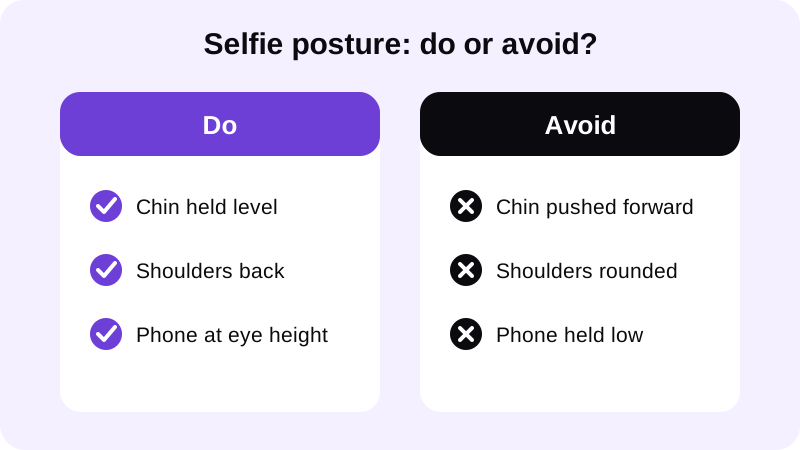
How do you stand and hold the phone for a straighter posture selfie?
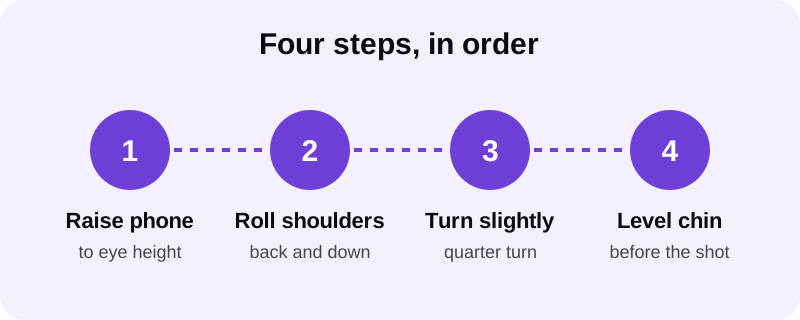
Fix the camera first, then the stance — in that order, because the angle does most of the visible work. Each step below builds on the last, so it's worth going through them in sequence rather than skipping to the ones that feel most natural.
- Raise the phone so the lens sits roughly level with your eyes or slightly above, not down near your chest.
- Roll your shoulders back and down, away from your ears, before you lift your arm into shot.
- Turn your body slightly off-camera rather than facing the lens flat-on; a quarter turn reads straighter.
- Lift your chin just enough to level it with the floor, without tilting your head back.
- Glance at the frame one more time before the shot, not the screen itself, to avoid dropping your head.
What about a mirror selfie instead of an arm's-length one?
A mirror selfie gives you more distance and control over the angle, since you can step back and line the phone up at eye level instead of holding it close. If you're shooting shirtless or in a fitted top for a gym photo, check lighting too — flat, even light shows your actual posture more honestly than a shadowy gym mirror does, and it makes it easier to judge afterward whether your shoulders actually sat where you thought they did.
How can Chisel clean up posture after the photo is taken?
Chisel doesn't have a tool that bends your spine or rotates your shoulders in an existing photo — posture itself still comes from the stance and camera angle in the original shot. What it can do is tidy the proportions around that posture so the overall photo reads straighter and more put-together, which matters because a slightly rounded upper body often photographs as a proportion issue as much as a posture one.
- Shoulders and Waist sliders: these two build a V-taper, widening the body at shoulder height and slimming it at the waist, which can make a slightly rounded upper body look squarer in the frame.
- Height slider: stretches the whole photo vertically from the centre and trims the top and bottom edges, which can make a stance look a touch taller and less compressed.
- Natural limit: every slider shows a green natural limit, so you can nudge the proportions without the photo stopping looking like you.
None of this replaces standing up straight for the shot. Think of it as cleanup, not correction — the sliders adjust proportion, not posture. Every slider runs on your phone and is free to use, so there's nothing to lose by trying a small adjustment and comparing it side by side with the original before deciding. For a deeper look at the pose and angle side specifically, see how to fix posture in a photo.
What other habits make a selfie look more confident overall?
Posture reads as part of a bigger picture: angle, lighting, and how proportioned the body looks in frame. A few small habits compound well together, and most of them cost nothing more than a second of extra attention before you tap the shutter.
- Light from in front, not above. Overhead light casts shadows under the brow and chin that exaggerate a forward-leaning head.
- Keep the frame slightly loose. Cropping too tight at the shoulders can make a straight stance look cramped or hunched.
- Widen the stance slightly. Feet shoulder-width apart gives a more grounded base than feet together, which tends to round the upper back.
- Check the side profile too. A straight-on selfie can hide a forward head position that shows up clearly from the side.
- Take a few in a row. Posture shifts slightly between frames, so picking the straightest of three or four shots beats trying to nail it on the first try.
If you're building out a full gym photo routine, it's worth reading about how to widen shoulders in a photo and pairing posture fixes with proportion edits for a more consistent result across your photos.
Is it worth editing the photo at all if the pose was already good?
If the stance and camera angle were solid, editing is optional — a well-posed, well-lit selfie often doesn't need any slider work. Chisel is there for the photos that are close but not quite right: a stance that's good but a waist that photographs a little wide, or shoulders that could read slightly broader. Every editing tool in the app is free to use, so there's no cost to trying a small adjustment and comparing it against the original before you decide. Chisel runs on Android through Google Play, with an iPhone version coming soon, and it doesn't require an account to use.
Whatever you change, keep it small and check the result against the untouched photo. A straighter-looking selfie should still look like a photo of you, not a different stance altogether, and the goal is always a photo you'd recognize as a good version of yourself, not a stranger standing in your clothes.
FAQ
Why does my posture look worse in a selfie than in the mirror?
A selfie is shot from arm's length, usually below eye level, which tips the chin forward and rounds the shoulders toward the lens. A mirror photo is shot from further back at a more level angle, so the same stance reads straighter there than it does in a close-up selfie.
Does holding the phone higher actually fix posture in a selfie?
Yes. Raising the phone to roughly eye height removes the downward angle that pushes the chin forward and rounds the upper back. It won't change how you're standing, but it removes the part of the slouch that's caused by the camera angle itself.
Can Chisel straighten my posture in an existing selfie?
Chisel doesn't have a posture-bending tool. Its Shoulders and Waist sliders build a V-taper that can make the upper body look straighter and more proportioned, and the Height slider stretches the photo vertically, each with a natural limit so the photo still looks like you.
Should I turn my body for a posture selfie?
A slight turn, with shoulders angled rather than flat to the camera, usually looks straighter than facing the lens head-on. It also sets up a cleaner V-taper if you edit the photo afterward with the Shoulders and Waist sliders.
What's the most common posture mistake in gym selfies?
Holding the phone low and looking down at the screen while shooting. That combination pushes the chin forward and curls the upper back, which is the opposite of the stance most men are going for in a gym selfie.