Best Lighting for Gym Progress Photos
Published · Updated
Quick answer
The best lighting for progress photos is soft, directional light from one side — a window, doorway or lamp — not flat overhead gym lighting or a flash. Side light creates the shadow that gives your torso visible shape, which also helps any later editing.
Key takeaways
- Side light creates shadow and shape; flat overhead light or flash erases it.
- Window daylight gives the most consistent gym progress photo lighting most people can access free.
- Turn slightly toward a gym's overhead lights to soften harsh shadows.
- Avoid flash, backlighting, and mixing warm and cool light sources.
- A well-lit, torso-visible photo gives Chisel's pose detection more to work with.
The best lighting for progress photos is soft, directional light from one side — a window, doorway, or a single lamp — not the flat glare of an overhead gym light or a flash. It gives your torso real shadow and shape instead of flattening it into a blur.
Why does lighting matter more than the pose?
A good pose can't save a photo where the light is working against you. Flat, straight-on light — like a phone flash or a ceiling light directly overhead — erases the small shadows that define your shoulders, chest and midsection. Those shadows are what make a photo read as three-dimensional instead of like a flat cutout.
This matters even more if you plan to edit the photo afterward. Chisel's pose detection automatically finds your torso in a photo, so its sliders can widen the shoulders, slim the waist or fill out the torso without any manual masking. It works best when your torso is clearly visible and lit evenly enough that the outline isn't lost in shadow or blown out by glare. A well-lit original photo simply gives any edit more to work with.
What lighting setup actually works in a gym or at home?
Getting gym progress photo lighting right doesn't take any equipment — it just means noticing where the light in the room actually comes from before you shoot.
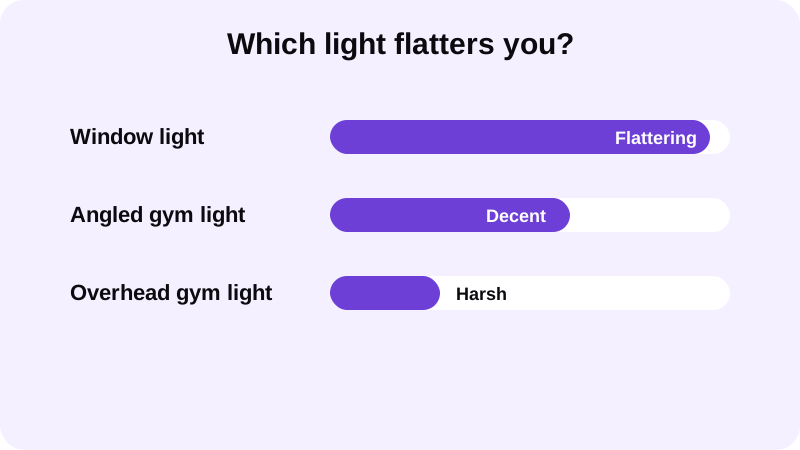
Window light
A window with daylight coming in at an angle — not direct sun through glass, just bright daylight — is the most reliable natural light for gym photos that most people already have access to. Stand a few feet from the window so the light falls across your torso rather than behind you. It's soft, it's free, and it doesn't change from one gym to the next, which makes it a solid baseline for any progress photo lighting setup.
Gym lighting
Most gyms use overhead fluorescents or LED panels that point straight down. Shot head-on, this creates hard shadows under your eyes, chin and pecs. Turning slightly so the light comes from more of an angle — even a small turn — softens those shadows and gives your chest and shoulders more visible shape.
Mirror selfies
Mirror photos aren't a light source themselves — whatever's lighting the room is lighting you. Check where the room's main light is coming from before you shoot, and angle yourself so it's hitting you from the side rather than straight above.
Lamps and ring lights
A single lamp, especially one with a shade that diffuses the bulb, placed slightly to one side of the camera, gives you controllable, repeatable light at home. Avoid pointing it straight at your face and chest — offset it so it grazes across your torso instead.
What should you avoid?
A few habits undo good lighting fast, and they're easy to fix once you know to watch for them.
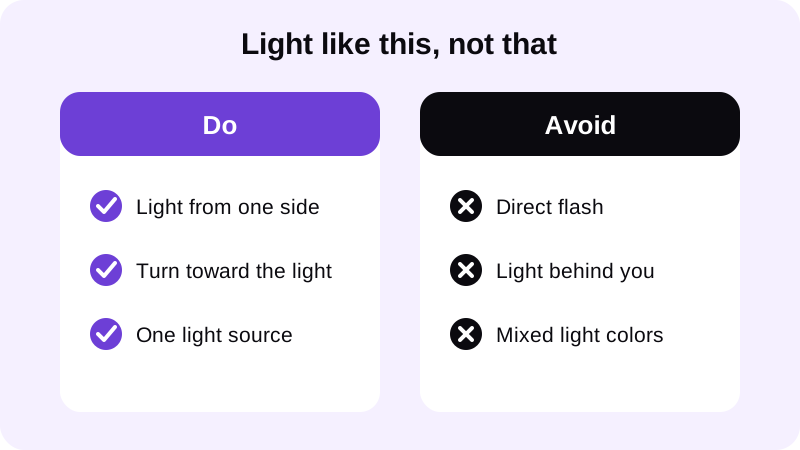
- Direct flash. It flattens shadows and often blows out skin tone, which makes any texture or definition disappear.
- Backlighting. Standing with a bright window or light behind you throws your torso into shadow and confuses both the viewer and any editing tool trying to read your outline.
- Mixed color temperatures. A warm lamp next to a cool overhead light can give your skin an uneven, patchy tone. Pick one dominant light source where possible.
- Harsh midday sun outdoors. It creates deep, unflattering shadows under the brow and chest. Open shade or early morning or evening light is more forgiving.
How does lighting affect editing your photo afterward?
Once you have a clean, evenly lit photo, editing it naturally is easier. Chisel's manual tools — Shoulders and Waist sliders for a V-taper, plus Abs and Muscle sliders that add a gentle fullness to the middle of the torso — run right on your phone, and every tool in the app is free to use; six-pack and muscle definition come from the optional AI Transform, which asks before it sends the photo to a cloud AI provider. Each slider shows a natural limit marked in green, so the result still looks like you rather than an inflated version of you.
If you'd rather let the app generate the edit for you, Chisel's optional AI Transform sends the photo to a third-party cloud AI provider to produce the result — and it asks first, every time, before sending anything. Whichever route you choose, the edited photo gets an AI-altered label written into its metadata, so the edit stays disclosed instead of hidden.
If you want the specifics on adding definition without it looking pasted on, see how to add a six-pack to a photo without looking fake and how to add muscle to a photo that looks real.
Good lighting also helps with details beyond the torso. If your progress photo includes your face, light it the same way: Chisel doesn't edit the face (no jawline, teeth or beard edits), and its Smooth filter smooths the whole photo rather than retouching skin, so side light that keeps your jaw out of shadow matters most. For a broader look at editing a full gym photo well, the guide on body editor for men covers proportion and realism across the whole frame, not just one feature.
Chisel exports an edited photo in HD. If your original photo is larger than roughly 2048 pixels on its long side, it gets scaled down to that size on import, so starting from a clean, well-lit shot matters more than starting from the largest file your phone can produce. The app requires no account, and every editing tool is free to use; the Pro subscription — which includes a short free trial — or a one-time Lifetime purchase simply remove ads and the watermark and add Pro templates. Once you're happy with the result, you can share it as an animated before/after reveal, a format built for showing an edit clearly rather than claiming a real transformation happened.
What's a simple lighting checklist before you shoot?
None of this requires special equipment — just a few seconds of attention to where the light in the room is actually coming from.
- Find a light source to one side, not directly overhead or behind you.
- Face the light at a slight angle rather than straight-on.
- Skip the flash — use ambient light instead.
- Keep your torso visible and unobstructed; a shirtless photo or fitted top both work well for editing later.
- Take a few shots at slightly different angles to the light so you have options.
Once the photo itself is solid, the editing side — adjusting proportions and adding definition with the optional AI Transform — has a much better base to work from. If you're new to what the app actually does before you start, Chisel AI: what it is and how it works walks through the tools in more detail.
FAQ
Is natural window light really better than a ring light for gym photos?
For most people, yes. Daylight through a window spreads evenly and doesn't flicker or shift color the way cheap ring lights can. Stand a few feet back so the light grazes across your torso from the side rather than facing you head-on, and you'll get shadow detail a ring light often washes out.
Why do gym mirror selfies look flat even in a bright gym?
Bright overhead lighting pointed straight down removes the side shadows that give your chest and shoulders shape, even though the room looks well lit to your eyes. Turning slightly so the light hits you at an angle, rather than facing the mirror dead-on, brings that shadow back.
Does the lighting in a photo affect how well an editing app can work with it?
Yes. Chisel's pose detection finds your torso automatically, and it works best when the outline is clear — not lost in deep shadow or blown out by glare. A well-lit original gives any edit, from a slider tweak to AI Transform's six-pack definition, more detail to build on.
Does Chisel upload my gym photo to a server?
Chisel's manual editing tools — the sliders for muscle, abs and waist — run on your phone. The optional AI Transform feature sends the photo to a third-party cloud provider to generate its result, and it asks first before doing so.
What resolution does Chisel export?
Chisel exports edited photos in HD. If your original photo is larger than about 2048 pixels on its long side, it gets scaled down to that size when you import it, so a sharp, well-lit source photo matters more than a huge file size.